Customize MX Anywhere 3 with LogiOps [ArchLinux]
logiops is an unofficial driver for Logitech mice and keyboard
(Currently compatible only with HID++ >2.0 devices.)
In this article, we will try to customize Logitech MX Anywhere 3 Wireless Mouse buttons using logiops, as a replace solution for Logitech Options which support Windows & Mac only.

Install logiops from AUR
1. Dependencies:
- This project requires C++14 complier,
cmake,libevdev,libudevandlibconfig. - Install dependencies:
yay -S cmake libevdev libconfig pkgconf- Simply install
logiopswith Arch User Repository:
yay -S logiops-git2. Start using logiops
- Start logiops daemon with
systemd:
sudo systemctl start logid- Set daemon to start at boot:
sudo systemctl enable logidCustom keys binding
1. Useful commands:
- Listing for connected device:
sudo logid -v- Debug config file (Highly recommend using when config file changed, by default is
/etc/logid.cfg)
sudo logid -v -c /etc/logid.cfg2. Remappable Keys & Features
➜ sudo logid -v
[DEBUG] Unsupported device /dev/hidraw0 ignored
[DEBUG] Unsupported device /dev/hidraw1 ignored
[DEBUG] Unsupported device /dev/hidraw2 ignored
[INFO] Device found: MX Anywhere 3 on /dev/hidraw3:255
[DEBUG] /dev/hidraw3:255 remappable buttons:
[DEBUG] CID  | reprog? | fn key? | mouse key? | gesture support?
[DEBUG] 0x50 |         |         | YES        |
[DEBUG] 0x51 |         |         | YES        |
[DEBUG] 0x52 | YES     |         | YES        | YES
[DEBUG] 0x53 | YES     |         | YES        | YES
[DEBUG] 0x56 | YES     |         | YES        | YES
[DEBUG] 0xc4 | YES     |         | YES        | YES
[DEBUG] 0xd7 | YES     |         |            | YES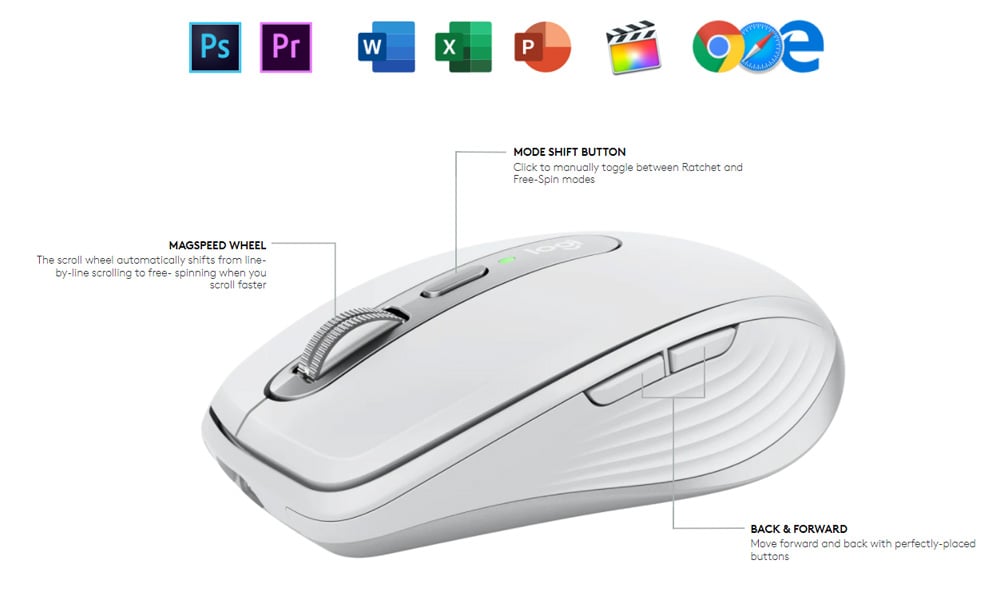
MX Anywhere 3 Button’s CID table:
| Buttons | CID |
|---|---|
| Magspeed Wheel | 0x52 |
| Mode Shift Button | 0xc4 |
| Back (thumb button) | 0x53 |
| Forward (thumb btn) | 0x56 |
All these 4 keys are gestures supported, we’re going to customize them.
Other 3 buttons are Mouse click buttons (0x50 and 0x51) and Devices Swicht Button (0xd7), just leave them alone for not getting fucked.
3. Customize configurations
- Smartshift configurations:
  smartshift: {
    on: true;
    threshold: 50;
};- High Resolution Scroll configurations:
  hiresscroll: {
    hires: true;
    invert: true;
    target: true;
       up: {
            mode: "Axis";
            axis: "REL_WHEEL_HI_RES";
            axis_multiplier: -1;
        },
        down: {
            mode: "Axis";
            axis: "REL_WHEEL_HI_RES";
            axis_multiplier: 1;
        }
};- Magspeed Wheel Button Customize:
    buttons: (
        {
            cid: 0x52;
            action =
            {
                type: "Gestures";
                gestures: (
                    {
                        direction: "Left";
                        mode: "OnInterval";
                        interval: 10;
                        action =
                        {
                            type: "Keypress";
                            keys: ["KEY_VOLUMEDOWN"];
                        };
                    },
                    {
                        direction: "Right";
                        mode: "OnInterval";
                        interval: 10;
                        action =
                        {
                            type: "Keypress";
                            keys: ["KEY_VOLUMEUP"];
                        };
                    },
                    {
                        direction: "None"
                        mode: "OnRelease";
                        action =
                        {
                            type: "Keypress";
                            keys: ["BTN_MIDDLE"];
                        }
                    }
                );
            };
        }
Usages: - Hold down button and move to trigger gesture: - Left: Volume - - Right: Volume + - Click: Middle Mouse
- Mode shift button: {
cid: 0xc4;
action =
{
type: "Gestures";
gestures: (
{
direction: "None";
mode: "OnRelease";
action = {
type: "CycleDPI";
dpis: [400, 1600, 2800];
}
}
);
}
}
- Thumb button {
cid: 0x53;
action =
{
type: "Keypress";
keys: ["KEY_BACK"];
};
},
{
cid: 0x56;
action =
{
type: "Keypress";
keys: ["KEY_FORWARD"];
};
}
);} );
### References
- [PixlOne/logiops](https://github.com/PixlOne/logiops/wiki/Configuration)
- [Logitech Archwiki](https://wiki.archlinux.org/title/Logitech_MX_Master)
- [Linux event codes](https://github.com/torvalds/linux/blob/master/include/uapi/linux/input-event-codes.h)