Window & Powershell Initializing Setup
Seting up a new working environment for Windows. Since my company assign me a window11 workstation in my onboarding day, I realize that I need to have to workaround with Windows an PowerShell. Hope there’s something you guys can use 😃.
Terminal
1. PowerShell 7
Windows came with PowerShell 5.1 by default. If you’re willing to try, here’s the tutorial.
2. Windows Terminal
PowerShell
1. Chocolately
- First, we need some package manager (or actually a window-cli-installer, as we called it 😅), chocolately work for me. You can consider Scoop or Winget instead.
- To install Chocolately, make sure you have an administrative shell (right-click powershel and ‘Run as Administrator’) and paste this:
Set-ExecutionPolicy Bypass -Scope Process -Force; [System.Net.ServicePointManager]::SecurityProtocol = [System.Net.ServicePointManager]::SecurityProtocol -bor 3072; iex ((New-Object System.Net.WebClient).DownloadString('https://community.chocolatey.org/install.ps1'))- After that, you may need to restart your computer, then you can use
choco installto install your needs.
2. Shell promt with oh-my-posh
After a while, I found oh-my-posh 😕. Yep, that’s it. Similar to what I normally use for Zsh in Linux, and also has the built-in spaceship-promt
- Install/Update oh-my-posh:
Set-ExecutionPolicy Bypass -Scope Process -Force; Invoke-Expression ((New-Object System.Net.WebClient).DownloadString('https://ohmyposh.dev/install.ps1'))- Fonts:
- Arcording to the docs, we need to install Nerd Fonts for the promt working properly.
- You can find fonts that recommend in the docs and install whatever you want.
- Edit
$PROFILE(similar to~/.bashrcor~/.zshrcin Linux):
notepad $PROFILE⚠ Create new Profile if doesn’t exist:
New-Item -Path $PROFILE -Type File -Force
- Add this line to your
$PROFILE
oh-my-posh init pwsh --config "$env:POSH_THEMES_PATH/${YOUR_THEME}.omp.json" | Invoke-ExpressionYou can choose whatever you want in the built-in theme list and replace the ${YOUR_THEME} with it.
3. Shell auto-completions & auto-suggestions
Do you get tired of typing CTRL+R to look up commands in the history? Similar to zsh-autosuggestions, simply add the following to your profile:
# up&down arrow for history search
Set-PSReadLineKeyHandler -Key UpArrow -Function HistorySearchBackward
Set-PSReadLineKeyHandler -Key DownArrow -Function HistorySearchForward
Add one more if you’d like to view all autocomplete options after pressing TAB:
# menu complete using TAB instead of CTRL+SPACE
Set-PSReadlineKeyHandler -Chord Tab -Function MenuComplete
4. MagicTooltips
This gif explain everything 😆.

- Prerequisites:
- PoweShell 7+
- NerdFont (optional)
- Installations:
Install-Module MagicTooltips- Profile Configurations:
$global:MagicTooltipsSettings = @{
    HorizontalAlignment = "Right"
    VerticalOffset = 0
    HorizontalOffset = 2
    Providers= @{
        Azure = @{
            Commands = "az,terraform,pulumi,terragrunt"
            FgColor = "#3A96DD"
            Template = "\ufd03 {value}"
        }
        Kubernetes = @{
            Commands = "k,kubectl,helm,kubens,kubectx,oc,istioctl,kogito,k9s,helmfile"
            FgColor = "#3970e4"
            Template = "\ufd31 {value}"
        }
        Aws = @{
            Commands = "aws,awless,terraform,pulumi,terragrunt"
            FgColor = "#EC7211"
            BgColor = ""
            Template = "\uf270 {value}"
        }
    }
}
Import-Module MagicTooltips- Result

Neovim
For me, who start with the Linux Vim since the first day, Window Notepad or even Notepad++ such a pain for typing 😅.
- First install Neovim with chocolately:
choco install neovim- Install vim-plug:
iwr -useb https://raw.githubusercontent.com/junegunn/vim-plug/master/plug.vim |`
ni "$(@($env:XDG_DATA_HOME, $env:LOCALAPPDATA)[$null -eq $env:XDG_DATA_HOME])/nvim-data/site/autoload/plug.vim" -Force- Configuring Neovim & vim-plug:
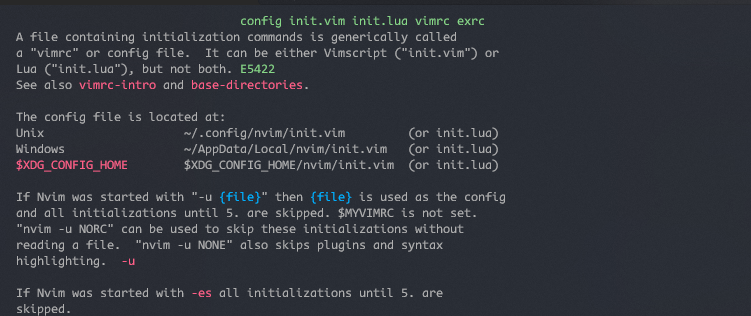
By default for window, nvim’s stdpath at
C:\Users\$USERNAME\AppData\Local\nvim. You can open a new nvim and type:h init.vimto check it out.
- Create whatever you want for the vim-plug configurations inside
init.vim. For references, checkout my default configurations at github. - Start nvim and run
:PlugInstall, nvim is now ready to use 👌.